PLATFORM · ACCESS & COMPLIANCE
Access and compliance in the platform
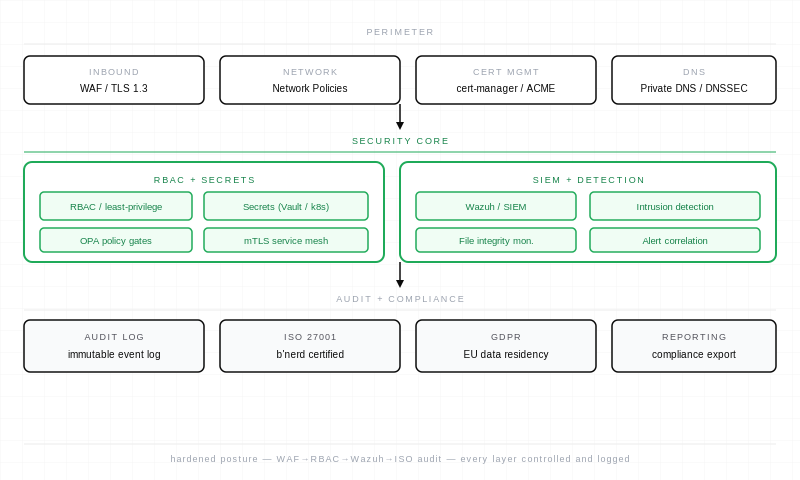
Organisations, projects and roles decide who may do what. MFA protects the accounts, the audit log records changes.
Who it's for
- • Teams that want developers, operations and finance to work with separate permissions.
- • IT leads who have to prove who had access (ISO 27001, customer audits).
- • Agencies and MSPs that look after several organisations with one account.
How it works
- Create an organisation and projects, invite members.
- Give each member a role preset (admin, developer, operator, viewer, billing_manager) or set permissions one by one.
- Turn on MFA: admins must use it, it is available to every other account. Organisation admins can require it for all members.
- Review changes and access in the audit log.
What's included
Roles and presets
Admin or Member. Members only have what was explicitly granted; anything not granted is denied.
Permissions per category
Projects, compute, Kubernetes, object storage, apps, billing, members, settings, alerting and feature requests, each with read, create, update, delete.
Permissions per project
Grant individual members rights on a single project, never more than their organisation rights allow.
Several organisations
One account can hold a different role in each organisation.
MFA
TOTP with any standard authenticator app, plus 16 single-use recovery codes.
Audit log
Records changes such as role and permission changes, logins and account closures. Admins see it in the dashboard under Settings → Audit Log and via the API.
Review queries
Who holds which permission, who had denied access attempts, which permission combinations break separation of duties.
Good to know
- • Mandatory MFA applies to admin accounts. For members MFA is optional unless the organisation requires it.
- • Organisation admins currently switch on the requirement for all members via the API. The dashboard toggle is in development.
- • The MFA prompt applies to interactive browser sign-ins. API tokens, including the one the CLI stores, are exempt.
- • The audit log is retained for 12 months and visible to admins only.
FAQ
Frequently asked questions
-
Admins only. Members have no access.
-
Yes. Organisation admins set "mfa_required" on the organisation. Today that is done via the API; the dashboard toggle follows.
-
Sign in with a recovery code and enrol again. If all codes are used up, support can unlock the account.
Do you have questions or would you like a personalized offer? We are happy to advise you.
Contact
Contact
Our cloud experts are happy to provide personalized advice.
- Our Office
-
Sillemstraße 76A
20257 Hamburg, Deutschland
Mon - Fri: 09:00 AM - 06:00 PM
- Telefon
- +49 40 239 69 754 0
- hello@bnerd.com